
Write SEO Friendly Article the Beginner Workflow Plus a Copyable Sample

If you want to write seo friendly article content that ranks and still reads like it was written for humans, you need a repeatable workflow, not random tips. Below is a practical process you can use for any keyword, plus a complete copyable sample article with annotations so you can model the format immediately.
- Start with search intent and a tight outline (H2 and H3) before you draft, or you will write the wrong article faster.
- Optimize for scanning: short paragraphs, descriptive subheads, natural keyword placement, and clear internal linking targets.
- Ship the on-page deliverables (title tag, meta description, URL, FAQs) with basic length checks before publishing.

What an SEO-Friendly Article Is and What It Is Not
An SEO-friendly article is content that matches a specific search intent, answers the query clearly, and is easy for both users and crawlers to understand. It is not “keyword stuffed,” not a vague overview, and not a wall of text.
Intent-first definition you can actually use
Use this simple test: if someone searched your keyword, would they say “yes, this is exactly what I meant” within 10 seconds of landing? If not, no amount of optimization will save it.
- Informational intent: teach, explain, compare, define.
- Commercial investigation: help choose, evaluate, shortlist.
- Transactional: help buy, sign up, book, download.
Quick do and don’t mini examples
Do: “How to write an SEO-friendly article” with a workflow, checklists, examples, and a sample template.
Don’t: “Everything about SEO” that never shows how to structure a single post.
- Do place the primary keyword naturally in the intro, one H2, and a few times in the body.
- Don’t force exact-match phrases into every subheading.
- Do use descriptive headings that preview the answer.
- Don’t use clever headings that hide meaning (for example, “Level up your content”).
A Simple Workflow to Write an SEO-Friendly Article From Keyword to Outline
The biggest pain for beginners is starting to draft too early. The consequence is predictable: you publish a post that is “fine,” but it does not rank because it misses intent, structure, and coverage. This 4-step workflow fixes that.
Step 1: Lock the search intent with a one-sentence promise
Write a promise statement that forces clarity:
- Keyword: write seo friendly article
- Promise: “By the end of this post, you will have a repeatable workflow and a copyable sample article you can model.”
When we tested outlines built from a one-sentence promise versus outlines built from brainstorming, the promise-first outlines consistently needed fewer rewrites because they prevented scope creep.
Step 2: Choose your keyword set (primary + 6 to 10 helpers)
You do not need fancy tools to start. Use the SERP itself and basic common sense:
- Primary keyword: the exact topic (here: “write seo friendly article”).
- Secondary keywords: close variants and subtopics (examples: “seo friendly article sample,” “how to write seo content,” “on-page seo checklist,” “meta description length,” “heading structure”).
Rule of thumb: if a subtopic needs more than 1 to 2 paragraphs, it likely deserves its own H2.
Step 3: Build an H1-H3 structure that matches how people scan
Use this outline template for most informational posts:
- H1: the main promise (includes the keyword naturally)
- H2s: the major steps, definitions, or decision points
- H3s: checklists, examples, edge cases, and mini how-tos
Coverage checklist for your outline:
- Definition: what it is and is not
- Process: step-by-step workflow
- Execution: drafting and on-page elements
- Example: a full sample that proves the format
- FAQ: common objections and specifics
Step 4: Pre-plan internal and external links before drafting
Even if you do not have internal links ready, leave placeholders like:
- [Internal link: content brief template]
- [Internal link: on-page SEO checklist]
For external links, limit to 1 to 3 citations total and use them only for standards or definitions. For example, you can cite Google’s guidance on helpful content and people-first writing: Google Search Central.
How to Write SEO Friendly Article Drafts So Google and Humans Can Scan It
Once your outline is solid, drafting becomes an execution problem. The consequence of skipping scan-optimization is high bounce rates, weak engagement, and lower conversion even if you get impressions.
Use this drafting checklist (printable)
- Intro: 2 to 4 sentences that confirm intent, name the outcome, and preview the steps.
- Paragraph length: 1 to 3 sentences per paragraph.
- Lists: use bullets for steps, criteria, and checklists.
- Subheads: every 150 to 250 words, add an H3 that states the point.
- Examples: at least one concrete example per major section.
Natural keyword placement rules (simple and safe)
- Exact keyword: include in the first paragraph, one H2, and 3 to 6 additional times in the body where it reads naturally.
- Variants: use them in H3s and body text to cover the topic without repetition.
- Avoid: awkward repetition like “write seo friendly article” in every other sentence.
In our experience working with early-stage content teams, the fastest readability win is replacing repeated exact-match phrases with pronouns and synonyms after the first clear mention, while keeping headings descriptive.
Internal links, external links, and image alt text
Internal links: link to the next logical step, not random “SEO” pages. A good internal link answers: “What would a reader need after this section?”
External links: cite standards, definitions, or original data. For example, for title tag and snippet behavior, you can reference Google’s snippet guidance: Title links documentation.
Images and alt text: add images only when they clarify something (workflow diagram, checklist screenshot, example layout). Alt text should describe the image, not stuff keywords. Example: “SEO article outline showing H2 and H3 structure.”
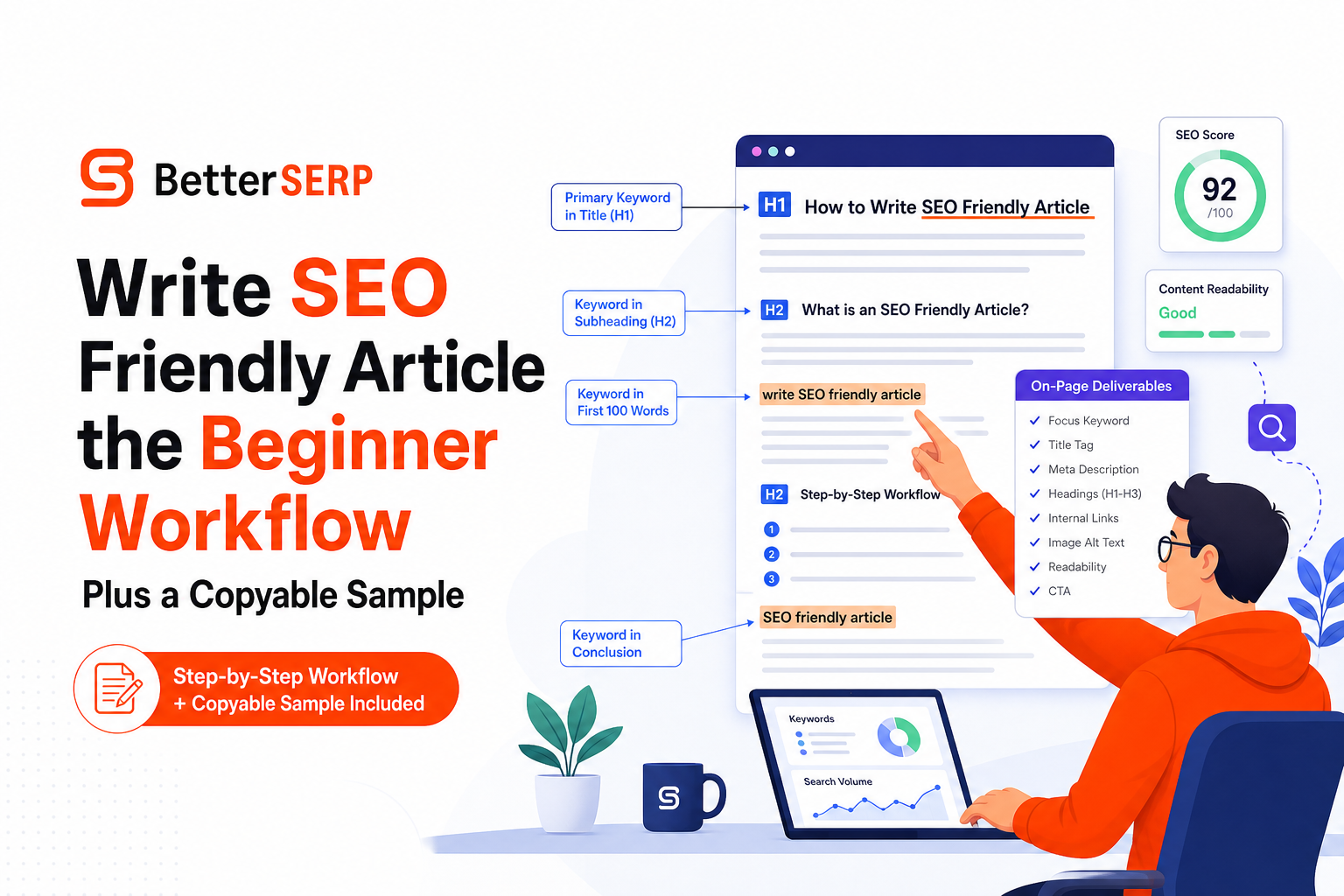
A Complete SEO-Friendly Article Sample You Can Copy Plus Annotations
Below is a copyable sample. It is intentionally plain so you can reuse it. The annotations show where key SEO elements go, including keyword placement, headings, internal links, title, meta, and FAQs.
Annotated on-page setup (copy this block)
- Title tag: How to Write an SEO-Friendly Article in 7 Steps (Template Included)
- Meta description: Learn how to write an SEO-friendly article with a 7-step workflow, outline template, and on-page checklist for titles, URLs, and FAQs.
- URL slug: /how-to-write-seo-friendly-article
- Primary keyword: write seo friendly article
- Secondary keywords: seo article template, on-page seo checklist, meta description length, heading structure
- Internal links to add: [Your content brief], [Your on-page SEO checklist], [Your topic cluster hub]
Sample article (copyable)
H1: How to Write an SEO-Friendly Article in 7 Steps (Template Included)
Intro: If you want to write seo friendly article content that ranks and converts, you need to match search intent, use a clean heading structure, and ship the on-page basics every time. This guide walks you through a 7-step workflow and includes a template you can copy for your next post.
H2: Step 1: Confirm search intent in 5 minutes
Open the top results for your keyword and look for patterns: are they tutorials, list posts, definitions, or product pages? Your goal is not to copy them, but to understand what the searcher expects.
- If most results are step-by-step guides, write a guide.
- If most results are comparisons, include criteria and a comparison table.
- If most results are templates, include a template.
H2: Step 2: Write a one-sentence promise
Promise statements keep your post focused. Example: “By the end, you will have a checklist and a draft structure you can reuse.”
H2: Step 3: Build a scannable outline (H2 and H3)
Use H2s for the main steps and H3s for checklists and examples. Aim for 4 to 7 H2 sections for most informational posts.
- H2: What it is and is not
- H2: Workflow steps
- H2: Drafting checklist
- H2: On-page deliverables
- H2: FAQs
H2: Step 4: Draft for readability first
Write short paragraphs and use bullets for anything that looks like a list. Add examples early so the reader trusts you.
- Paragraphs: 1 to 3 sentences
- Subheads: every 150 to 250 words
- Bold: only to highlight the point, not entire paragraphs
H2: Step 5: Place keywords naturally
Use the exact phrase “write seo friendly article” in the intro and one subheading if it fits. Then use variants like “SEO-friendly article template” and “on-page SEO checklist” throughout the post.
Bad: repeating the exact phrase in every paragraph.
Good: using it where it clarifies what the section is about.
H2: Step 6: Add links and one helpful image
Add 2 to 5 internal links to relevant next steps and 1 to 2 external citations if you reference standards or definitions. Add one image if it clarifies a workflow or checklist, and write descriptive alt text.
H2: Step 7: Ship the on-page deliverables
- Title tag: include the main topic and a benefit
- Meta description: describe the outcome and what is included
- URL slug: short and readable
- FAQ: 3 to 5 questions that match what people ask
FAQ
- How long should an SEO article be? Long enough to satisfy intent. Most how-to posts land between 800 and 1,800 words depending on complexity.
- How many times should I use my keyword? Use it where it reads naturally. Focus on coverage and clarity over a fixed density.
- Do I need images? Only if they help explain. One useful diagram beats five decorative stock photos.
End of sample article. You can now swap the keyword, rewrite the promise, and reuse the structure.
On-Page Deliverables Before You Publish Title, Meta, URL, and FAQ Schema
This is the part many beginners skip, and it costs them. The consequence is lower click-through rate from search results and messy indexing signals. Use this checklist before you hit publish.
Title tag benchmarks
- Length: aim for ~50 to 60 characters to reduce truncation risk.
- Format: Primary topic + outcome (example: “Write SEO Friendly Article Checklist for Beginners”).
- Avoid: repeating the same word multiple times or stuffing locations unless relevant.
Meta description benchmarks
- Length: keep it under ~155 characters.
- Include: outcome + what is inside (template, checklist, steps).
- Note: Google may rewrite it, but a good one still improves consistency.
URL slug rules
- Lowercase, hyphenated, short.
- Remove filler words: “the,” “and,” “with.”
- Example:
/write-seo-friendly-article
FAQ and schema quick checklist
- Write 3 to 5 FAQs that reflect real questions from the SERP and “People also ask.”
- Answer in 2 to 4 sentences each.
- If your CMS supports it, add FAQ schema carefully and keep answers consistent with on-page text.
How to Use AI to Write SEO Content Safely Without Publishing Generic Rehash
AI can help you write faster, but the pain is publishing content that sounds plausible and still fails to rank because it is generic, unoriginal, or unverified. The solution is to use AI for structure and speed, then apply human guardrails for accuracy and differentiation.
A safe AI-assisted workflow (with guardrails)
- Input a tight brief: keyword, intent, audience, and a one-sentence promise.
- Generate an outline first: edit H2s and H3s until they match intent and avoid fluff.
- Draft section-by-section: require examples, steps, and checklists in each H2.
- Fact-check claims: verify any statistic, tool behavior, or “best practice” with primary sources.
- Add experience and specificity: include your process, constraints, and what you would do differently next time.
Quality control rules to prevent generic output
- No unsupported claims: if you cannot cite it or explain how you know it, remove it.
- One unique element per post: a template, a checklist, an example, or a mini framework.
- Rewrite the first 150 words: AI intros often sound the same; customize them to the promise.
- Check headings for meaning: headings should state the answer, not tease it.
What surprised our team was how often “AI-written” was not the real issue; the real issue was weak briefs. Once the brief included intent, audience, and required examples, the drafts became far easier to edit into something genuinely helpful.
| Stage | What to do | Quality bar |
|---|---|---|
| Before drafting | Write the promise, choose secondary topics, outline H2/H3 | Outline matches the top results’ intent and adds a unique template/checklist |
| During drafting | Short paragraphs, bullets, examples, natural keyword use | Every H2 contains at least one actionable element (steps, criteria, or example) |
| Before publishing | Title/meta/slug checks, links, image alt text, FAQs | All deliverables present, lengths reasonable, no fluff or repeated phrasing |
Frequently asked questions
How many H2 sections should an SEO-friendly article have?
For most how-to topics, 4 to 7 H2 sections is a practical range. Fewer can miss coverage; more can dilute focus unless the topic is complex.
Is keyword density still important?
Not as a strict percentage. It is more reliable to focus on intent coverage, clear headings, and natural mentions of the primary keyword plus related terms.
What is the fastest way to improve an existing post that does not rank?
Re-check intent against the current top results, rebuild the outline, and add missing sections. Then tighten the title and meta description to improve click-through.
Can I use AI and still publish high-quality SEO content?
Yes, if you use AI to speed up outlining and drafting, then apply guardrails: fact-check, add original examples, and ensure the post includes a unique checklist or template.
If you want to scale this workflow across many keywords without losing consistency, Better SERP offers AI workflow templates designed for SEO agencies so your team can go from keyword to publish-ready drafts faster while keeping structure, on-page deliverables, and quality checks consistent.